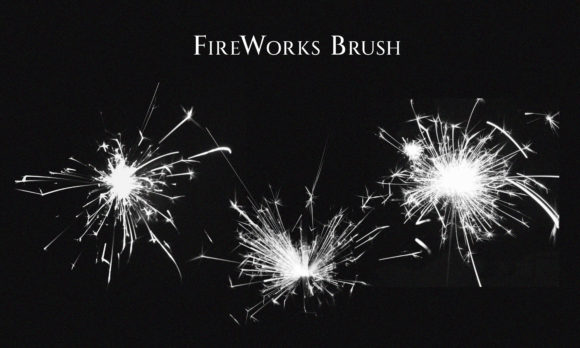
Mastering Digital Pyrotechnics: A Guide to High-Resolution Fireworks Brushes
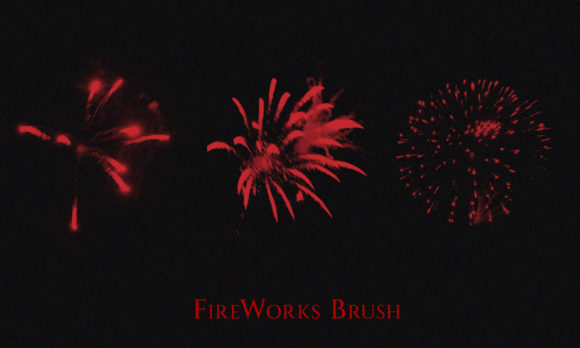
In the realm of digital design, few elements capture attention quite like the explosive brilliance of fireworks. Whether you are crafting a poster for a New Year’s Eve celebration, designing a dynamic advertisement for a summer festival, or adding subtle special effects to a cinematic composition, the quality of your light sources can make or break the final image. This is where Fireworks Brushes become an indispensable tool in your creative arsenal. Rather than spending hours manually painting sparks and gradients, designers can leverage high-resolution brushes to achieve photorealistic results instantly.
The modern designer’s workflow demands efficiency without compromising on aesthetic fidelity. By integrating specialized brush sets into software like Adobe Photoshop, creators gain access to a library of pre-rendered, high-fidelity bursts that behave like real paint but with the complexity of photographic lighting. This article explores the utility, features, and practical applications of these tools, helping you determine if they are the right fit for your next project.
The Evolution of Digital Special Effects
Historically, adding fireworks to a digital composition was a labor-intensive process. Designers had to rely on stock photos, which often came with rigid backgrounds, difficult lighting conditions, and limited angles. Removing the background from a low-resolution JPEG could result in jagged edges and halo effects, ruining the realism of the composite. Fireworks Brushes solve this problem by offering transparency and flexibility at the source.
These brushes are not merely simple stamps; they are sophisticated digital assets designed to mimic the physics of light. When you apply a brush stroke, it doesn’t just place a static image; it interacts with your canvas settings, allowing for rotation, scaling, and color adjustment. The inclusion of transparent PNGs alongside the brush files ensures that even users who prefer drag-and-drop workflows over brush engines can achieve seamless integration. This dual-format approach caters to both traditional painters and collage-style composers.
Key Features of Professional-Grade Brush Sets
Not all brush packs are created equal. When evaluating a set of Hi-res brushes, several characteristics distinguish professional tools from amateur attempts. Understanding these features will help you maximize the value of your download.
- High Resolution: The primary advantage of these tools is clarity. A high-resolution brush retains detail even when scaled up for large-format prints, such as billboards or event banners. Pixelation is the enemy of realism, and premium brushes are rendered at sufficient DPI to prevent this.
- Transparency and Blending: Real fireworks are made of light, not solid matter. Therefore, the best brushes utilize alpha channels to create natural transparency. This allows the background to show through the sparks, creating a believable glow rather than a flat, opaque sticker look.
- Variety of Bursts: A comprehensive set includes various types of explosions—peonies, chrysanthemums, willows, and crackles. Having diverse shapes prevents repetitive patterns in your design, keeping the viewer’s eye engaged.
- Instructional PSD Files: Perhaps the most underrated feature is the inclusion of an instructional PSD file with Layer Styles. This file serves as a roadmap, showing exactly how the creator achieved specific looks. It often includes pre-set blending modes, opacity levels, and color overlays that you can copy and paste into your own work.
Practical Applications Across Industries
The versatility of Fireworks Brushes extends far beyond holiday greetings. Their ability to simulate intense light sources makes them valuable across multiple sectors. Here is how different professionals can leverage these tools.
- Advertising and Marketing: Brands often use fireworks to signify celebration, success, or launch events. A car commercial might use a subtle burst to highlight the sleek lines of a new model, while a retail advertisement might use vibrant explosions to draw attention to a "Blowout Sale." The key here is control; brushes allow marketers to place the light exactly where it highlights the product.
- Event Promotion: For concert posters, festival flyers, and club promotions, energy is paramount. Fireworks convey excitement and movement. Using hi-res brushes allows designers to create dynamic compositions that feel alive, encouraging potential attendees to feel the vibe before they even buy a ticket.
- Cinematic and Photo Manipulation: Photographers often enhance night sky shots where the actual fireworks were underexposed or poorly positioned. By compositing high-quality brushes, they can balance the exposure of the foreground subject with a spectacular background, creating a hero shot that would be impossible to capture in a single exposure.
- Social Media Content: In the fast-paced world of social media, thumb-stopping visuals are crucial. Animated GIFs or static posts featuring bright, colorful bursts perform well during celebratory periods. The transparent PNGs included in many sets are perfect for quick overlay work in mobile editing apps.
Integrating Brushes into Your Workflow
To get the most out of your Fireworks Brushes, it is essential to understand how they interact with your software. While the brushes themselves are powerful, their impact is amplified by proper technique. Most professional sets come with JPG files of each brush for previewing, but the real magic happens within the layer stack.
Start by importing the brush file into your preferred application. When applying the brush, avoid using pure white. Instead, sample colors from the environment or use soft pastels to mimic the chemical hues of real pyrotechnics—strontium for red, barium for green, and copper for blue. Use the instructional PSD file as a reference. Look at the Layer Styles applied in the demo file. You will often find that "Color Dodge" or "Screen" blending modes are used to make the sparks appear luminous against dark backgrounds.
Furthermore, do not rely on a single stamp. Build your explosion. Start with a core burst, then add smaller, scattered sparks around the periphery. Vary the opacity and size to create depth. This layering technique transforms a flat graphic into a three-dimensional event. The inclusion of transparent PNGs is particularly useful here, as you can drag and drop individual elements to fine-tune the composition without worrying about brush spacing settings.
Evaluating Suitability: Is This Tool Right for You?
Before downloading any asset pack, consider your specific needs. Fireworks Brushes are ideal for designers who need speed and consistency. If you are working on a tight deadline for a New Year’s campaign, these brushes can reduce hours of work to minutes. However, they may not be suitable for projects requiring absolute photographic authenticity from a specific real-world event, as the brushes are stylized representations rather than documentation.
Consider the output medium. For web use, standard resolution may suffice, but for print advertisements, ensure the brushes are truly high-resolution. Check the file sizes and dimensions provided in the description. A set that includes both ABP (brush) files and PNGs offers the best value, providing flexibility for different workflows. Additionally, the presence of an instructional PSD indicates a higher level of support from the creator, suggesting that the assets are well-tested and user-friendly.
Common Limitations and Considerations
While powerful, these tools have limitations. Overuse can lead to cluttered designs. Fireworks are visually loud; using too many can overwhelm the viewer and obscure the main message. Always prioritize composition and hierarchy. Another consideration is color harmony. Since fireworks are bright and saturated, they can clash with muted brand palettes. Use adjustment layers to tint the bursts to match your overall color scheme.
Additionally, remember that lighting affects the entire scene. If you add a bright firework to the left of your subject, ensure you add corresponding rim lighting or reflections on the subject to maintain physical plausibility. The Hi-res brushes provide the source of light, but you must manually adjust the rest of the image to react to that light realistically.
Conclusion
Incorporating Fireworks Brushes into your design toolkit opens up a world of creative possibilities. From enhancing promotional materials to adding dramatic flair to artistic compositions, these tools offer a blend of convenience and quality that is hard to replicate manually. By leveraging high-resolution assets, transparent PNGs, and instructional resources, you can elevate your visual storytelling with minimal effort.
Whether you are a seasoned professional looking to streamline your workflow or a hobbyist eager to experiment with light and color, understanding how to effectively use these brushes will enhance your digital creations. Remember to focus on natural integration, respect the physics of light, and let the brilliance of the fireworks serve your narrative, not distract from it. With the right approach, your designs will not just be seen—they will be remembered.