Evaluating Big Watercolor Brushes for Photoshop: A Practical Guide for Digital Artists
In the expansive ecosystem of digital art tools, brush sets often promise more than they deliver. Many creators find themselves downloading packs that offer little beyond basic texture overlays or static stamps. However, Big Watercolor Brushes for Photoshop distinguishes itself by focusing on the core mechanics of fluid simulation and pressure sensitivity. This set is not merely a collection of static images; it is a functional tool designed to replicate the unpredictable, organic behavior of traditional watercolor paint on paper. For professionals and serious hobbyists alike, understanding the technical nuances of these brushes can significantly enhance workflow efficiency and artistic output.
The Mechanics of Fluid Simulation
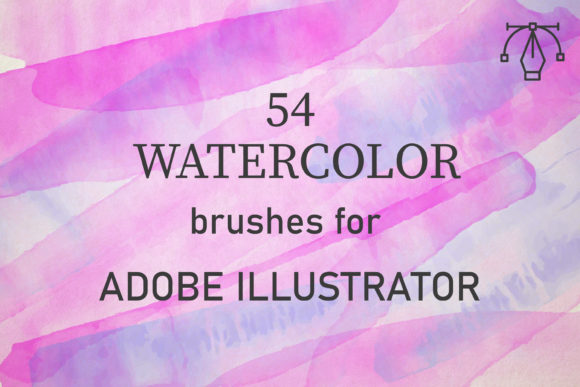
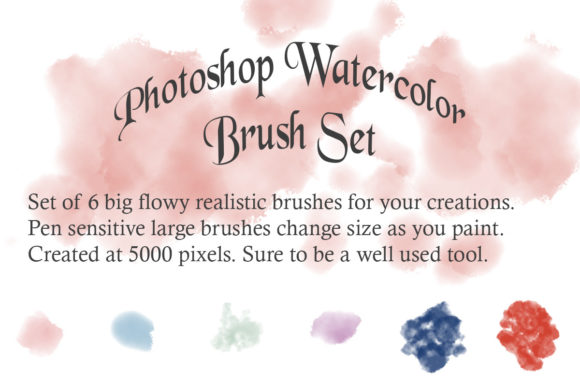
The primary appeal of this specific brush set lies in its engineering. Unlike standard round brushes with fixed opacity, these tools are programmed to respond dynamically to input. The description highlights that the brushes "flow and change sizes to create a dynamic, pen pressure sensitive experience." This is a critical feature for any artist aiming for realism. In traditional watercolor painting, the amount of water on the brush and the pressure applied to the paper determine the stroke’s width and saturation. These digital counterparts mimic that physical relationship.
When you press harder with your stylus, the brush expands and deposits more pigment. As you lighten your touch, the stroke tapers naturally, creating those delicate, wispy edges characteristic of high-quality watercolor work. This responsiveness reduces the need for manual masking or erasing to achieve natural transitions, allowing for a more intuitive and faster creative process. The result is a stroke that feels alive, varying in thickness and density just as real paint would when dragged across textured paper.
Resolution and Technical Specifications
One common pitfall in digital asset acquisition is low-resolution textures that pixelate when scaled. This set addresses that concern by providing high-res 2500 pixel brushes. This resolution is substantial for most professional applications, including large-format prints, web banners, and detailed illustrations. Having access to high-definition tip shapes ensures that even when working on large canvases, the edges of your strokes remain crisp and the internal textures retain their complexity.
The package includes an ABR file, which is the native format for Adobe Photoshop brushes. This ensures seamless installation and compatibility across various versions of the software. Upon loading the file, users gain immediate access to six distinct brushes. While six may seem like a modest number compared to bundles containing hundreds of assets, the quality-over-quantity approach is often more valuable. A smaller, curated set allows artists to master each tool rather than getting lost in redundancy.
Variety Within the Set
The set is divided into two functional categories. Three of the brushes are designed with dynamic size variation, as previously noted. These are the workhorses of the pack, ideal for laying down base washes, creating organic shapes, and building up layers of color. The other three brushes likely serve complementary roles, such as adding texture, splatter effects, or dry-brush details. This combination provides a balanced toolkit for completing a piece from start to finish.
- Dynamic Flow Brushes: Best for main subjects, broad strokes, and fluid backgrounds.
- Textural Accents: Ideal for adding grit, grain, and realistic paper interaction.
- High-Resolution Tips: Ensures clarity and detail in close-up views.
This structure supports a non-destructive workflow. Artists can layer the dynamic brushes for depth and use the static or textural variants to break up uniformity, preventing the "digital look" that often plagues computer-generated art.
Real-World Application and Usability
For marketers and designers, these brushes offer a way to humanize brand visuals. In an era where clean, vector-based graphics dominate, introducing hand-painted elements can create emotional resonance. Whether designing a logo for a boutique coffee shop, creating social media graphics for a wellness brand, or illustrating an editorial piece, the organic feel of watercolor adds warmth and authenticity. The ease of use means that even designers without extensive traditional painting experience can achieve convincing results quickly.
Educators and content creators will also find value in these tools. Creating engaging thumbnails, book covers, or educational materials often requires unique visual elements that stand out in crowded feeds. The ability to generate custom, flowing paint strokes allows for rapid prototyping of ideas. Since the brushes are pressure-sensitive, they encourage experimentation. Users can test different pressures and angles to see how the pigment behaves, fostering a playful yet productive creative environment.
Who Benefits Most?
While anyone interested in digital painting can benefit, certain groups will find Big Watercolor Brushes for Photoshop particularly advantageous:
- Freelance Illustrators: Who need reliable tools to meet tight deadlines without sacrificing artistic quality.
- Small Business Owners: Who handle their own marketing materials and want a distinctive, handcrafted aesthetic.
- Digital Hobbyists: Who are transitioning from traditional media and want a familiar, responsive digital experience.
- Web Designers: Looking to add subtle, organic textures to UI elements or background designs.
The learning curve is minimal for those already familiar with Photoshop’s brush engine. However, beginners should note that achieving the best results requires a graphics tablet. Using a mouse will limit the ability to leverage the pressure-sensitive features, reducing the brushes to static stamps. Therefore, investment in a basic pen tablet is recommended to fully utilize this asset.
Limitations and Considerations
It is important to maintain realistic expectations. No digital brush can perfectly replicate the chemical interaction of water, pigment, and paper fibers. While these brushes are highly effective, they still require skillful application. Overusing them can lead to muddy compositions if layering is not managed carefully. Additionally, the set contains only six brushes. Artists seeking a vast library of specialized tips, such as specific leaf shapes or intricate splatters, may need to supplement this set with other resources.
Furthermore, the performance of these high-resolution brushes depends on your computer’s processing power. Working on extremely large canvases with multiple layers of complex brushes may slow down older systems. It is advisable to manage layer counts and save frequently to ensure a smooth workflow.
Long-Term Value and Integration
The true measure of a digital asset is its longevity in your toolkit. Many brush packs are downloaded, used once, and forgotten. Big Watercolor Brushes for Photoshop has the potential to become a staple due to its versatility. The dynamic nature of the brushes means they can be adapted to various styles, from loose, abstract washes to tight, controlled illustrations. As your skills improve, you will discover new ways to manipulate the settings—such as flow, opacity, and scattering—to customize the brushes further.
Integrating these brushes into your regular workflow can also inspire new creative directions. The unpredictability of the fluid strokes can help break through creative blocks, offering happy accidents that guide the composition. For professionals, this translates to faster ideation and more unique final products. For hobbyists, it provides a satisfying, meditative creative outlet that closely mirrors the joy of traditional painting.
In conclusion, this set offers a focused, high-quality solution for artists seeking realistic watercolor effects. By prioritizing pressure sensitivity and high resolution, it delivers a user experience that respects the intricacies of traditional media while leveraging the convenience of digital tools. Whether you are refining your portfolio or enhancing commercial projects, these brushes provide a reliable foundation for expressive, fluid artwork.