Mastering Procreate Wreath Vine Brushes
Digital illustration has evolved from simple sketching tools into a robust ecosystem where efficiency meets artistic expression. For creators working in Procreate, the difference between a project that feels laborious and one that flows naturally often comes down to the right assets. This is where specialized tools like Procreate Wreath Vine Brushes change the game. These are not merely static stamps; they are dynamic, pressure-sensitive instruments designed to streamline the creation of botanical elements, allowing artists to focus on composition rather than repetitive line work.
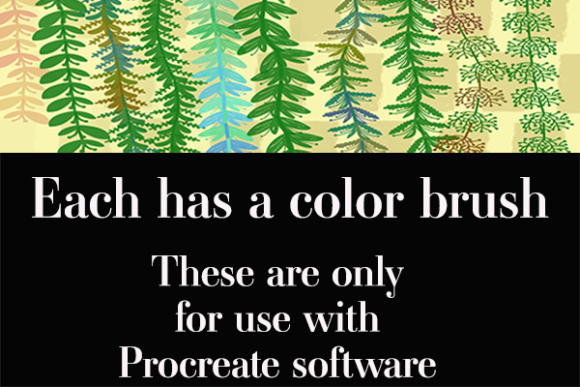
The core appeal of these brushes lies in their dual functionality. While many digital brush sets offer single-color outlines or flat shapes, this collection introduces a nuanced approach to color application. As you use the color versions, the more pressure you apply with your Apple Pencil, the more beautiful the colors become enhanced. This feature mimics the natural variation found in real foliage, where light hits leaves differently depending on their angle and density. It transforms a simple stroke into a textured, vibrant element that breathes life into digital wreaths, borders, and floral arrangements.
Understanding the Mechanics of Dynamic Color
To truly leverage Procreate’s capabilities, one must understand how these brushes interact with the software’s engine. Unlike standard image stamps that remain identical regardless of input, these vines are engineered to respond to the subtleties of hand movement. The pressure sensitivity is calibrated to adjust opacity, saturation, and hue shifts simultaneously. When you press lightly, the vine appears delicate and airy, perfect for background textures or subtle accents. As you bear down, the colors deepen and enrich, creating focal points that draw the viewer’s eye.
This dynamic range eliminates the need for manual coloring after placement. In traditional digital workflows, an artist might stamp a green leaf, then select a darker green to add shadows, and perhaps a lighter tint for highlights. With these pre-colored vines, that process is condensed into a single gesture. This not only saves time but also ensures a cohesive color palette throughout the piece, as the variations are built into the brush definition itself.
Versatility in Scale and Application
One of the most significant strengths of Procreate Wreath Vine Brushes is their scalability. They are created to be small and very large depending on your creative juices while using them. Whether you are designing a delicate monogram for a wedding invitation or a bold, sprawling border for a YouTube thumbnail, these brushes adapt seamlessly. The vector-like quality of the brush tips ensures that even when scaled up significantly, the edges remain crisp and the details do not pixelate.
This versatility opens up a wide array of practical applications across various industries:
- Graphic Design and Branding: Entrepreneurs and marketers can quickly create organic, hand-drawn elements for logos, packaging, and social media graphics. The ability to customize size and color intensity allows for brand-consistent visuals without hiring an illustrator for every minor update.
- Educational Materials: Teachers and educational content creators can use these vines to frame worksheets, certificates, and digital presentations. The natural aesthetic makes learning materials feel more welcoming and less rigid.
- Digital Planning and Journaling: Hobbyists who use digital planners on iPads can enhance their layouts with custom headers and dividers. The pressure-sensitive color feature allows for personalization that matches daily moods or seasonal themes.
- Print-on-Demand Products: Artists selling designs on platforms like Etsy or Redbubble can use these brushes to create intricate wreath designs for mugs, t-shirts, and stationery. The high resolution and clean lines ensure professional-quality prints.
Enhancing Workflow Efficiency
For professionals, time is a critical resource. The primary benefit of integrating Procreate Wreath Vine Brushes into your toolkit is the drastic reduction in production time. Creating realistic botanical illustrations from scratch requires a deep understanding of anatomy, light, and shadow. Even for skilled artists, drawing each leaf individually is tedious. These brushes provide a foundational structure that looks hand-drawn but is generated instantly.
Moreover, the non-destructive nature of Procreate allows for endless experimentation. You can lay down a vine, adjust its size, rotate it, and change its blending mode without committing to permanent pixels. If the color enhancement from pressure isn’t quite right, you can easily adjust the layer’s opacity or apply a color overlay. This flexibility encourages creative risk-taking, as mistakes are easily corrected.
Technical Considerations and Best Practices
It is important to note that these assets have specific technical requirements. They can only be used with Procreate software. This limitation is due to the proprietary brush engine format (.brushset) that Apple’s iPad-exclusive app utilizes. Users attempting to import these files into Photoshop, Clip Studio Paint, or other desktop applications will find them incompatible. Therefore, ensuring you have an iPad and the latest version of Procreate is a prerequisite for utilization.
To get the most out of these brushes, consider the following tips:
- Calibrate Your Apple Pencil: Since the color enhancement relies on pressure sensitivity, ensure your Pencil is properly paired and calibrated. Test different pressure curves in Procreate’s settings to find what feels most natural for your hand.
- Layer Management: Use separate layers for different parts of your wreath. This allows you to adjust the color balance of individual vines without affecting the entire composition. Grouping these layers keeps your workspace organized.
- Combine with Textures: While the brushes are beautiful on their own, adding a subtle paper texture overlay can enhance the organic feel. Multiply blending modes work well to integrate the digital vines with textured backgrounds.
- Experiment with Blending Modes: Try setting the brush layer to ‘Multiply’ for a watercolor effect or ‘Screen’ for a glowing, ethereal look. The pre-colored nature of the brushes interacts uniquely with different blending modes.
Final Thoughts on Creative Freedom
In the realm of digital art, tools should serve the vision, not constrain it. Procreate Wreath Vine Brushes offer a perfect balance of structure and freedom. They provide the botanical accuracy needed for professional results while allowing the spontaneity of hand-drawn art through pressure-sensitive color dynamics. Whether you are a seasoned illustrator looking to speed up your workflow or a beginner eager to create stunning floral designs, these brushes provide a reliable, efficient, and aesthetically pleasing solution. By understanding their mechanics and exploring their versatile applications, you can elevate your digital creations with minimal effort and maximum impact.