Mastering Digital Chalk Art with 12 Procreate Chalk Calligraphy Brushes
In the evolving landscape of digital illustration, few tools bridge the gap between nostalgic analog charm and modern efficiency quite like chalk textures. For artists, educators, and designers working within the iPad ecosystem, the 12 Procreate Chalk Calligraphy Brushes offer a compelling solution for creating authentic hand-lettered designs. This comprehensive set is not merely a collection of digital stamps; it is a carefully curated toolkit designed to replicate the tactile resistance and organic imperfection of real chalk on a blackboard.
Understanding how to leverage these tools requires more than just downloading a file. It demands an appreciation for the interplay between hardware sensitivity and software configuration. Whether you are crafting social media graphics, designing educational materials, or developing brand assets, this article explores the practical applications, technical requirements, and creative potential of this specific brush pack.
The Anatomy of Authentic Digital Chalk
The primary appeal of the 12 Procreate Chalk Calligraphy Brushes lies in their ability to mimic the physical properties of calcium carbonate on slate. Unlike standard monoline digital pens, these brushes are engineered to respond dynamically to pressure and tilt. However, this functionality comes with a critical prerequisite: you must use an Apple Pencil. Without the pressure sensitivity provided by the Apple Pencil, the brushes will default to a uniform, monoline stroke, stripping away the nuanced variation that defines calligraphic art.
The set includes twelve distinct calligraphy brushes, each tuned for specific strokes and styles. From broad, sweeping downstrokes to delicate, textured upstrokes, these tools allow for a smooth hand lettering experience with a genuine chalk texture. The developers have focused on eliminating the "digital sheen" often associated with vector-based lettering, ensuring that every curve and corner retains a gritty, realistic edge.
Key Components of the Package
When you acquire this product, you are receiving more than just the brush library. The package is designed to be a complete workflow solution for chalk-style design. Here is what is included:
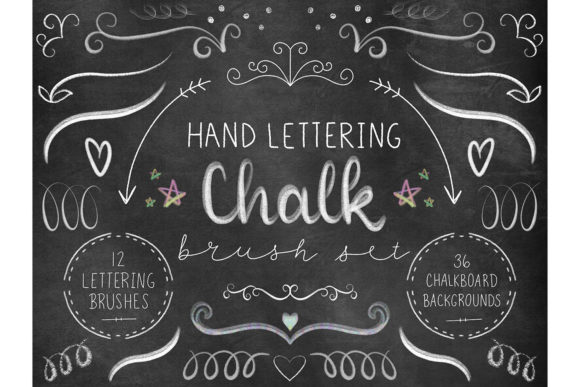
- 12 Calligraphy Brushes: A diverse range of nibs optimized for different lettering weights and styles.
- 36 Extra Large Chalkboard Texture Digital Papers: High-resolution backgrounds measuring 6000x6000 pixels (20 inches x 20 inches at 300 DPI), providing ample space for detailed compositions.
- PDF Instructions: A guide to help users install the brushes and understand best practices for layer settings.
It is crucial to note that you must have Procreate installed on your iPad to use this product. These brushes are not compatible with other illustration software such as Photoshop or Clip Studio Paint, as they rely on Procreate’s specific brush engine architecture.
Practical Applications for Creators and Businesses
The versatility of the 12 Procreate Chalk Calligraphy Brushes extends far beyond hobbyist doodling. Professionals across various industries can integrate these tools into their daily workflows to add warmth and personality to their projects.
- Educational Content Creation: Teachers and online course creators can produce engaging worksheets, presentation slides, and video thumbnails that mimic the familiar classroom blackboard aesthetic. The high resolution of the included papers ensures that text remains crisp even when projected on large screens.
- Social Media Marketing: Brands seeking a rustic, artisanal, or approachable vibe can use these brushes for Instagram posts, Pinterest pins, and story highlights. The chalk texture stands out against the polished, glossy visuals that dominate most feeds, capturing user attention through contrast.
- Menu and Signage Design: Cafés, boutiques, and event planners can draft digital mockups of chalkboard menus or welcome signs. While the final output might be printed or fabricated physically, the digital drafting process allows for rapid iteration and error correction without the mess of real chalk dust.
- Wedding and Event Stationery: Designers can create save-the-dates, invitations, and table numbers that feature elegant, hand-lettered chalk typography. The organic feel of the brushes adds a romantic, handmade touch that resonates with couples seeking non-traditional aesthetics.
Evaluating Suitability: Is This Set Right for You?
Before investing time in mastering these tools, it is essential to assess whether they align with your current project needs and technical setup. The 12 Procreate Chalk Calligraphy Brushes are ideal for users who value texture and organic variation over geometric precision. If your work requires clean, vector-like lines with perfect symmetry, traditional digital ink brushes may serve you better.
However, if you aim to evoke nostalgia, warmth, or a handcrafted feel, this set excels. The inclusion of 36 high-quality chalkboard textures is a significant value-add. Many artists spend hours searching for seamless, high-resolution background textures online. Having these pre-sized at 6000x6000 pixels means you can start creating immediately without worrying about image quality or tiling issues.
Technical Considerations and Limitations
While the brushes are powerful, they are not magic. Achieving the desired look requires practice and an understanding of digital layering. One common limitation users face is the expectation of instant perfection. Real chalk is unpredictable; it skips, breaks, and varies in opacity. These brushes replicate that unpredictability, which means some strokes may require multiple passes or adjustments to the opacity slider to achieve the desired density.
Furthermore, the reliance on the Apple Pencil cannot be overstated. Users attempting to use these brushes with a finger or a generic capacitive stylus will find the experience frustratingly flat. The pressure sensitivity is the core mechanism that drives the tapering and thickening of the calligraphic strokes. Without it, the "calligraphy" aspect is lost, leaving only a textured line.
Tips for Maximizing Your Workflow
To get the most out of the 12 Procreate Chalk Calligraphy Brushes, consider adopting the following practices:
- Experiment with Layer Blending Modes: Try setting your chalk layers to "Multiply" or "Overlay" when working on colored backgrounds. This can help the white or pastel chalk colors interact more naturally with the underlying texture, mimicking how real chalk pigments sit on top of a board.
- Utilize the Included Papers: Do not overlook the 36 digital papers. They are optimized for the brushes, meaning the texture grain aligns well with the brush noise. Using a mismatched background can sometimes make the chalk look pasted on rather than integrated.
- Adjust Streamline Settings: If you find your hand shaking affects the smoothness of your curves, adjust the "Streamline" feature in Procreate’s brush settings. This stabilizes your strokes while still allowing the pressure sensitivity to dictate the line weight.
- Read the PDF Instructions: The included guide often contains specific settings or tips from the creator that can troubleshoot common issues, such as brush lag or unexpected transparency.
Conclusion
The 12 Procreate Chalk Calligraphy Brushes represent a specialized tool for a specific aesthetic goal. They offer a robust, professional-grade solution for anyone looking to incorporate the timeless appeal of chalk lettering into their digital workflow. By combining responsive brush engines with high-resolution assets, this set removes the technical barriers often associated with creating realistic textured art.
For general consumers, it offers a fun and accessible way to explore lettering. For professionals, it provides a reliable asset library that can speed up production times while maintaining high artistic standards. As long as you possess the necessary hardware—an iPad with an Apple Pencil—and the Procreate app, this toolkit opens up a world of creative possibilities, allowing you to write, draw, and design with the soul of a traditional artist and the convenience of modern technology.