Crumpled Paper Stamp Brushes for Digital Art
Adding texture to digital designs can be the difference between a flat, sterile image and a piece of art that feels tactile and alive. For many creators, achieving an authentic paper look involves hours of scanning real documents, adjusting contrast levels, and wrestling with layer masks. This is where Crumpled Paper Stamp Brushes change the workflow entirely. Instead of building textures from scratch, you can create a crumpled paper texture effect in a few clicks, allowing you to focus on composition and storytelling rather than technical setup.
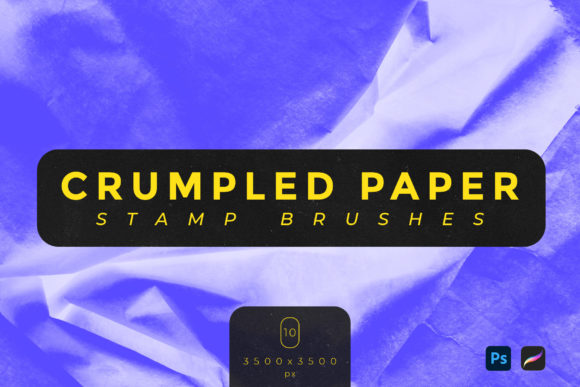
This collection offers ten distinct brushes designed specifically to mimic the organic irregularities of folded, crushed, and aged paper. Whether you are a graphic designer working on a vintage poster or a digital illustrator looking to add depth to a character background, these tools provide an immediate solution. The brushes come in both .ABR and .Brushset formats, ensuring compatibility with the two most popular digital painting platforms: Adobe Photoshop and Procreate. With dimensions around 3500x3500 pixels, each stamp provides high-resolution detail that remains crisp even when scaled for large-format prints.
Why Texture Matters in Modern Design
In an era dominated by sleek, vector-based graphics and ultra-clean interfaces, imperfection has become a valuable aesthetic asset. Human eyes are naturally drawn to variation. A perfectly smooth white background can feel cold or unfinished, whereas a surface with subtle creases, shadows, and grain invites the viewer to look closer. Using Crumpled Paper Stamp Brushes allows you to inject this sense of history and physicality into your work without leaving your desk.
The primary value of these brushes lies in their efficiency and realism. Traditional methods of creating paper textures often result in repetitive patterns that the brain quickly identifies as artificial. Because these stamps are derived from real paper interactions, they carry unique light and shadow data that is difficult to replicate manually. This makes them ideal for projects requiring an authentic, handcrafted feel, such as wedding invitations, book covers, packaging mockups, and social media content that aims to stand out in a crowded feed.
Practical Applications for Creators
The versatility of this brush set means it fits seamlessly into various creative workflows. Here are several ways professionals and hobbyists alike can integrate these tools into their daily projects:
- Digital Collage and Mixed Media: Combine photographic elements with torn paper edges and crumpled backgrounds to create surreal or nostalgic compositions. The high resolution ensures that the texture holds up alongside detailed photos.
- Branding and Packaging Mockups: Small business owners and marketers can present logo concepts on textured backgrounds to give clients a better sense of how the brand might look on physical materials like recycled paper or craft envelopes.
- Educational Materials and Worksheets: Teachers and educators can design engaging handouts that mimic the look of old maps or historical documents, making learning materials more visually stimulating for students.
- Social Media Graphics: Bloggers and influencers can use these textures as overlays to add warmth and depth to quote cards, announcements, or promotional posts, helping their content feel more personal and less corporate.
For beginners, the learning curve is minimal. Since these are stamp brushes, you do not need to master complex blending modes or filter galleries immediately. You simply select the brush, click on your canvas, and the texture appears. From there, you can adjust opacity, change the color to match your palette, or use erasers to refine the placement. This immediacy encourages experimentation, allowing users to try different looks rapidly without fear of ruining their base design.
Technical Specifications and Compatibility
Understanding the technical side of your tools is crucial for maintaining a smooth workflow. This specific set includes ten unique variations of crumpled paper, each offering a different pattern of folds and creases. The files are provided in two formats:
- .ABR (Adobe Brush): Designed for Adobe Photoshop users. These can be easily imported via the Brush Panel or by double-clicking the file while Photoshop is open.
- .Brushset (Procreate): Optimized for iPad users working in Procreate. These import directly into your brush library, ready for use with Apple Pencil pressure sensitivity if desired, though stamp brushes typically apply a consistent image regardless of pressure.
It is important to note that these brushes ONLY WORK WITH ADOBE PHOTOSHOP AND PROCREATE SOFTWARE. They are not compatible with other programs like Clip Studio Paint, Affinity Photo, or GIMP unless those programs have specific import features for these proprietary formats, which is rare. Always ensure your software is updated to the latest version to avoid any import errors.
The dimensions of approximately 3500x3500 pixels strike a balance between file size and quality. This resolution is sufficient for most web graphics, standard prints, and even larger posters when used strategically. However, if you are printing on massive billboards, you may need to scale the canvas appropriately or use the brushes at a smaller relative size to maintain pixel density.
Tips for Best Results
To get the most out of your Crumpled Paper Stamp Brushes, consider these practical tips during your design process:
First, think about lighting. Real crumpled paper has highlights and deep shadows. When placing a brush stamp, consider the light source in your overall composition. You might want to lower the opacity of the brush to let underlying colors show through, creating a more integrated look. Using blending modes like "Multiply" for darker creases or "Screen" for lighter highlights can help the texture interact naturally with the layers beneath it.
Second, avoid overusing the same stamp. While the set includes ten variations, rotating through them prevents visual repetition. If you are covering a large background, vary the rotation and scale of each stamp slightly. This randomness mimics the chaotic nature of real paper and keeps the viewer’s eye engaged.
Finally, remember that less is often more. A subtle hint of texture can add sophistication, while a heavy-handed application might distract from your main subject. Start with low opacity and build up gradually. This approach gives you greater control and ensures the texture supports your message rather than overpowering it.
By incorporating these high-quality stamps into your toolkit, you save time and elevate the perceived value of your digital creations. Whether you are a seasoned professional looking to speed up your workflow or a beginner eager to add professional touches to your art, these brushes offer a straightforward path to richer, more textured designs.