Procreate Dream Catcher Stamp Brushes: Streamlining Your Digital Illustration Workflow
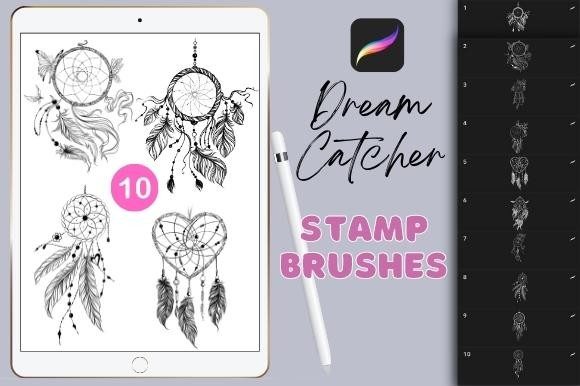
If you have ever spent hours meticulously drawing the intricate webbing of a dreamcatcher, only to realize the symmetry is slightly off or the time investment doesn't match the project's budget, you understand the value of efficiency in digital art. The Procreate Dream Catcher Stamp Brushes set offers a practical solution to this common bottleneck. This collection includes ten hand-drawn stamp brushes designed specifically for the Procreate app on iPad, allowing artists to integrate complex, culturally inspired motifs into their work with a single tap.
These are not generic, computer-generated shapes. Each brush is crafted from hand-drawn elements, preserving the organic imperfections and artistic flair that make illustrations feel human and authentic. For tattoo designers, illustrators, and hobbyists alike, having these assets ready in your library can transform a tedious task into a seamless part of your creative process.
Why Hand-Drawn Stamps Matter in Digital Art
In the world of digital illustration, there is often a tension between speed and authenticity. Vector tools can create perfect geometric circles and lines, but they frequently lack soul. On the other hand, drawing every feather and bead by hand ensures uniqueness but consumes valuable time. These dreamcatcher stamp brushes bridge that gap. Because they are based on hand-drawn originals, they retain texture, line weight variation, and natural flow.
When you use these stamps, you are not just placing a clip-art image; you are adding a stylized element that blends naturally with freehand sketches. This is crucial for professionals who need to maintain a cohesive aesthetic across a piece. Whether you are designing a bohemian-themed poster or sketching concepts for a client’s sleeve tattoo, the organic quality of these brushes ensures your final output looks curated rather than assembled.
Real-World Applications for Creators and Entrepreneurs
The utility of this brush set extends far beyond simple doodling. Different users will find distinct advantages depending on their professional needs and personal projects.
Tattoo Design and Concept Art
For tattoo artists, time is money. Clients often request traditional or neo-traditional designs featuring dreamcatchers, which require precise symmetry and detailed shading. Using Procreate Dream Catcher Stamp Brushes allows artists to rapidly generate multiple layout options during a consultation. You can place a base structure, then customize the feathers, beads, and webbing to suit the client’s body contour. This speeds up the approval process and lets you focus on customizing the unique aspects of the design rather than redrawing standard elements.
Print-on-Demand and Merchandise
Small business owners selling t-shirts, tote bags, or phone cases often rely on trending aesthetics. Bohemian and spiritual motifs remain perennially popular. With these ten various stamp brushes, you can quickly create composite designs. Combine a dreamcatcher stamp with typography or floral elements to produce unique merchandise graphics. Since the brushes are high-resolution, they scale well for print products, ensuring your designs look crisp on physical goods.
Digital Planning and Journaling
The community of digital planners using iPads is vast. Users who create digital journals or stickers love adding decorative elements to their layouts. These dreamcatcher stamps serve as beautiful headers, dividers, or focal points in monthly spreads. They add a touch of elegance without requiring the user to have advanced drawing skills. It empowers everyday users to create visually stunning pages that reflect their personal style.
Understanding the Technical Constraints
Before downloading or purchasing, it is vital to understand the technical environment these tools operate in. These brushes can only be used in the Procreate App on iPad. This is a critical distinction for users who might work across multiple platforms. If you primarily use Photoshop on a desktop, Clip Studio Paint on Android, or any other drawing application, this brushset will not work. Procreate uses a proprietary brush engine, meaning these files are incompatible with other software ecosystems.
This limitation is not necessarily a drawback if you are already invested in the Apple ecosystem. Procreate is renowned for its intuitive interface and powerful brush engine, which handles stamp brushes exceptionally well. However, if you are considering switching workflows, ensure that your primary device is an iPad capable of running the latest version of Procreate. Trying to convert these brushes for other apps often results in loss of quality or functionality, so it is best to use them within their intended environment.
Maximizing Creativity with Customization
While these are "stamp" brushes, they are not static images that must be used as-is. The true power lies in how you manipulate them within Procreate. Here are practical ways to enhance their utility:
- Color Variation: Change the hue and saturation to match your palette. A dreamcatcher doesn't have to be black or brown; try pastels for a soft look or neon colors for a cyberpunk twist.
- Layer Blending Modes: Experiment with multiply, overlay, or screen modes to integrate the stamp into your background textures seamlessly.
- Transformation Tools: Use the transform tool to stretch, rotate, or distort the stamps. This helps fit the design into awkward spaces or creates dynamic movement in your composition.
- Combining Elements: Since you get ten various brushes, layer them. Use one for the hoop, another for the web, and others for hanging feathers. This modular approach allows for infinite variations.
Who Should Consider This Brush Set?
This tool is ideal for intermediate to advanced Procreate users who want to speed up their workflow, as well as beginners who want to achieve professional-looking results without years of practice. It is particularly beneficial for:
- Freelance Illustrators: Who need to meet tight deadlines without sacrificing quality.
- Tattoo Artists: Who need to visualize concepts quickly for clients.
- Content Creators: Who need engaging visuals for social media posts or blog headers.
- Educators: Who create digital materials and want to add decorative, culturally relevant elements to their lessons.
However, if you are looking for fully automated, random-generation tools that create entirely new designs every time without user input, this might not be the right fit. These are stamps—assets you place and adjust. They require an artistic eye to arrange effectively. The value comes from your ability to integrate them into a larger composition.
Making the Right Choice for Your Toolkit
When evaluating whether to add Procreate Dream Catcher Stamp Brushes to your library, consider your current project load. Do you frequently encounter requests for bohemian, spiritual, or nature-inspired imagery? Do you find yourself redrawing similar circular patterns? If the answer is yes, this set pays for itself in time saved.
Remember that these are specialized tools. They won’t replace your fundamental drawing skills, but they will augment them. Think of them as a high-quality stencil set. They provide a foundation upon which you can build your unique vision. By handling the repetitive structural elements, they free up your mental energy to focus on lighting, color theory, and storytelling—the aspects of art that truly connect with viewers.
Ultimately, the goal of any digital tool is to remove friction between your idea and the final image. These ten hand-drawn dreamcatcher stamps do exactly that, offering a blend of convenience and artistic integrity that respects both your time and your craft. Whether you are designing a tattoo sleeve or decorating a digital journal, these brushes provide a reliable, stylish shortcut that keeps your workflow smooth and your creativity flowing.