Unlocking Organic Texture with Procreate Splatter Splodge Ink Brushes
Digital art often struggles with one specific hurdle: the sterile perfection of pixels. When every line is too smooth and every color fill is too uniform, the work can feel cold or manufactured. This is where the Procreate Splatter Splodge Ink Brushes change the game. By introducing hand-drawn, organic imperfections into your digital workflow, these tools bridge the gap between traditional media and modern convenience. They are not just another set of stamps; they are a comprehensive toolkit designed to inject soul, texture, and movement into your creative projects.
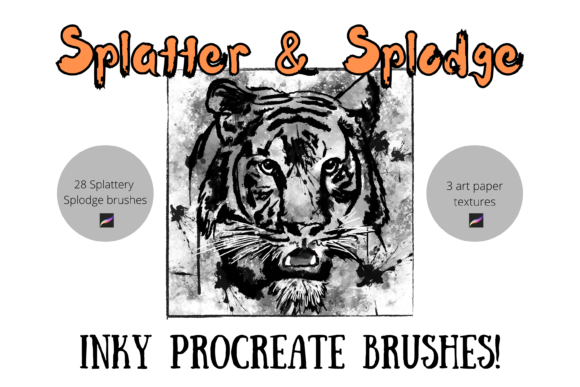
For artists, designers, and hobbyists alike, understanding how to leverage these 28 unique digital brushes can transform a flat composition into something that feels tactile and authentic. Whether you are designing for print-on-demand products or crafting personal greetings, the ability to mimic genuine ink behavior on an iPad opens up a world of possibilities that were previously reserved for messy studio spaces.
Bridging the Gap Between Digital and Physical Media
The primary appeal of this brush pack lies in its versatility. It includes multi-tonal and textured brushes that react dynamically to pressure and tilt, much like real ink would on rough paper. However, the standout feature for many users is the inclusion of three specific art paper texture brushes. These allow you to create a foundational layer that mimics genuine art paper. By simply choosing a light grey or cream color and painting the background, then setting your subsequent artwork layers to "multiply," you achieve a stunning illusion of depth. Your digital masterpiece appears to sit physically on textured stock, adding a level of realism that clients and viewers instantly appreciate.
This capability is particularly valuable for illustrators who want their work to stand out in a saturated market. In an era where AI-generated images often lack specific textural nuance, hand-crafted splatters and ink blots provide a human touch that algorithms struggle to replicate authentically. The brushes can be resized and recolored effortlessly, meaning a single splatter can become a subtle background accent or a bold, central graphic element depending on your needs.
Practical Applications for Print-on-Demand Entrepreneurs
If you are involved in the print-on-demand (POD) industry, these brushes are an invaluable asset. POD relies heavily on designs that look good on various substrates, from t-shirts to mugs and tote bags. Flat, vector-style graphics are common, but adding organic ink textures can elevate a design from generic to premium.
- Apparel Design: Use the splatter brushes to create distressed, vintage-style graphics for t-shirts. The irregular edges of the ink blots mimic screen-printing imperfections, giving the garment a worn-in, authentic aesthetic.
- Home Decor: For wall art and posters, the multi-tonal brushes allow for abstract compositions that resemble watercolor or sumi-e paintings. These styles are perennially popular in interior design because they add warmth and sophistication to a space.
- Stationery and Wrapping Paper: The seamless nature of many splatter patterns makes them ideal for repeating backgrounds. You can create custom wrapping paper designs that feel handmade, offering a unique selling point for small business owners during holiday seasons.
The key here is scalability. Because these are digital brushes within Procreate, you can test your designs at full resolution before sending them to print. This reduces the risk of pixelation and ensures that the intricate details of the ink textures remain crisp, whether printed on a small greeting card or a large canvas.
Elevating Personal Projects and DIY Crafts
Beyond commercial use, these brushes are perfect for DIY enthusiasts who enjoy digital crafting. Scrapbooking has moved into the digital realm, with many users creating hybrid albums that combine printed photos with digital embellishments. The Procreate Splatter Splodge Ink Brushes allow you to add decorative elements that look like real ink stains or paint splashes, enhancing the narrative of your memories without the mess of physical supplies.
Consider the creation of digital invitations for weddings or events. A minimalist invite can feel stark, but adding a subtle, colored ink wash behind the text using the texture brushes adds elegance and personality. Similarly, for greeting cards, the ability to quickly generate unique, non-repetitive floral or abstract motifs means you can send personalized cards that feel genuinely crafted rather than mass-produced.
For those who enjoy journaling, these tools offer a way to decorate digital planners. The variety in the pack ensures that no two pages need to look the same. You can use heavier splodges for chapter headers and finer, lighter specks for page borders, creating a cohesive yet dynamic visual language throughout your journal.
Technical Considerations and Workflow Tips
Before diving in, it is crucial to understand the technical requirements. These files are digital brushes specifically engineered for the Procreate app. They will not work in Photoshop, Clip Studio Paint, or other software. Furthermore, to fully utilize the pressure sensitivity and tilt features that give these brushes their realistic character, you need an Apple Pencil and an compatible iPad. Trying to use them with a finger or a generic stylus will result in a flat, unresponsive experience that fails to capture the intended organic feel.
When integrating these brushes into your workflow, consider the layering order. As mentioned, using the paper texture brushes on a bottom layer set to a neutral tone provides the best foundation. Place your main illustration or typography on layers above, using blending modes like "Multiply" or "Overlay" to let the texture show through. This technique preserves the legibility of text while ensuring the artwork feels integrated with the background.
Another consideration is color theory. While the brushes come with default settings, their true power is unlocked when you experiment with recoloring. Ink doesn't have to be black. Try deep blues, burnt siennas, or even pastel hues for a softer look. The multi-tonal nature of the brushes means that changing the foreground color affects the highlights and shadows within the splatter itself, maintaining depth regardless of the hue chosen.
Who Benefits Most from This Toolset?
This brush pack is not a one-size-fits-all solution, but it serves several distinct audiences exceptionally well:
- Traditional Artists Transitioning to Digital: If you miss the unpredictability of ink but love the undo button, these brushes provide a familiar tactile feedback loop.
- Graphic Designers Seeking Texture: Designers often spend hours searching for high-resolution texture overlays. Having them built into your brush library streamlines the process, allowing for real-time experimentation.
- Educators and Content Creators: Creating engaging educational materials or social media content often requires eye-catching visuals. Quick, stylish ink backgrounds can make text-heavy posts more appealing and shareable.
It is important to note that while these brushes are powerful, they require a degree of artistic intuition. They are tools, not automatic generators. The quality of the output depends on your hand movement, pressure control, and compositional choices. However, the learning curve is gentle, and the immediate visual feedback in Procreate allows for rapid iteration and improvement.
Ultimately, the Procreate Splatter Splodge Ink Brushes offer a practical solution to the sterility of digital art. They empower users to create work that feels human, textured, and alive. Whether you are building a brand around print-on-demand goods, crafting heartfelt personal items, or simply exploring new artistic horizons, these tools provide the organic edge needed to make your digital creations resonate in a physical world.