Enhancing Digital Art with Mushrooms Procreate Stamp Brushes
Digital illustration has evolved from a niche hobby into a primary workflow for countless creatives, yet the pressure to produce polished work quickly remains constant. Whether you are designing social media graphics, crafting digital invitations, or developing brand assets, time is often your most scarce resource. This is where specialized tools like Mushrooms Procreate Stamp Brushes become invaluable. These are not just generic shapes; they are carefully crafted, digitally hand-drawn elements designed to streamline your creative process while maintaining an organic, artistic feel.
It is crucial to understand the specific ecosystem these tools inhabit. These brushes are engineered exclusively for the Procreate app on iPad. They leverage the unique architecture of Procreate’s brush engine, meaning they will not function in Adobe Photoshop, Illustrator, or other desktop-based design software. Furthermore, to fully utilize the pressure sensitivity and tilt features that give these stamps their natural variation, an Apple Pencil is required. This specificity ensures that every tap and swipe translates into a high-quality, responsive mark that feels intuitive to use.
Why Hand-Drawn Stamps Matter in a Digital Workflow
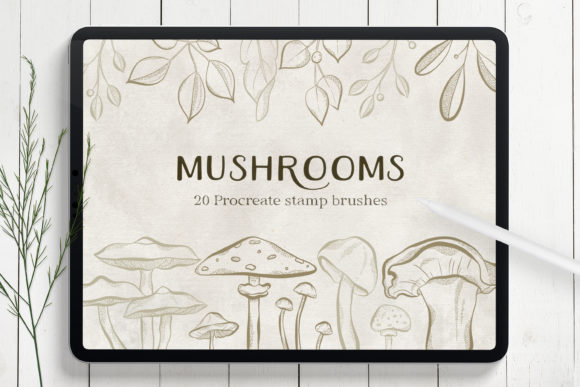
In a world saturated with vector clipart and sterile stock images, there is a growing demand for assets that feel human and authentic. The Mushrooms Procreate Stamp Brushes set includes 20 unique, hand-drawn stamp brushes. Because each mushroom cap, stem, and spore detail was drawn by hand rather than generated algorithmically, they retain subtle imperfections and textures that resonate with viewers. This authenticity is particularly valuable for creators who want their digital work to stand out without spending hours rendering every leaf and shadow from scratch.
When you download this set, you receive a single .brushset file inside a ZIP archive. Installing it is straightforward: you simply import it into Procreate, and instantly, twenty new tools appear in your brush library. This simplicity allows you to jump straight into creation, bypassing the steep learning curve associated with complex plugin installations or vector manipulation.
Practical Applications for Creators and Entrepreneurs
The versatility of these mushroom stamps extends far beyond simple nature illustrations. Here is how different users can integrate them into their daily workflows:
- Social Media Design: Content creators often need to produce engaging visuals rapidly. Using these stamps, you can create whimsical backgrounds for Instagram stories or Pinterest pins. A cluster of mushrooms can frame a quote, add texture to a product announcement, or serve as a playful border for a tutorial carousel. The organic shapes break up the rigid grid of social feeds, drawing the eye naturally to your content.
- Small Business Branding: For entrepreneurs running eco-friendly shops, apothecaries, or boutique cafes, branding needs to convey warmth and earthiness. These brushes allow you to design unique logos, packaging elements, or thank-you cards that align with a natural aesthetic. Instead of hiring an illustrator for every small asset, you can compose custom graphics in-house, maintaining brand consistency while saving costs.
- Digital Stationery and Invitations: If you sell digital planners, stickers, or printable invitations, these stamps are a goldmine. You can create decorative borders for wedding invites, birthday cards, or baby shower announcements. The ability to layer different mushroom sizes and orientations lets you build intricate frames that look professionally illustrated but take minutes to assemble.
- Educational Materials: Teachers and educational content creators can use these brushes to make learning materials more engaging. Biology lessons about fungi, forest ecosystems, or decomposition cycles become visually appealing when supplemented with charming, accurate-looking illustrations. Children’s books and activity sheets also benefit from the friendly, approachable style of hand-drawn stamps.
Creating Depth and Composition
One of the common mistakes beginners make with stamp brushes is using them flatly, resulting in a repetitive pattern. To get the most out of Mushrooms Procreate Stamp Brushes, consider how light and perspective interact with your subjects. Since you are using an Apple Pencil, vary your pressure. A lighter tap might create a distant, faded mushroom, while a firpress press creates a bold, foreground element.
You can also experiment with opacity and blending modes within Procreate. Lowering the opacity of a stamp layer can create a misty, atmospheric background, perfect for setting a mood in fantasy art or dreamy landscapes. By rotating and scaling individual stamps, you avoid the "copy-paste" look and instead create dynamic arrangements that guide the viewer’s eye through the composition. This level of control transforms simple stamps into powerful compositional tools.
Who Benefits Most from This Toolset?
This toolset is ideal for a wide range of users, but it specifically empowers those who value efficiency without sacrificing quality. Freelance illustrators can use these stamps to speed up background details, allowing them to focus their energy on main characters or focal points. Bloggers and marketers who lack advanced drawing skills can still produce custom, copyright-safe graphics that elevate their articles and newsletters. Hobbyists looking to relax after work can find joy in the meditative process of arranging these natural elements, creating digital art journals or mood boards without the stress of perfect anatomy or perspective.
Even publishers and indie authors can benefit when designing book covers or chapter headers for fantasy or nature-themed novels. The distinct style of these brushes adds a layer of professionalism and thematic consistency that generic fonts or photos cannot achieve.
Considerations Before You Begin
Before purchasing or downloading, ensure your hardware meets the requirements. As noted, these brushes are incompatible with Photoshop or Illustrator. They are built specifically for the iPad’s touch interface and Procreate’s brush dynamics. If you primarily work on a desktop, this tool will not fit your workflow. Additionally, while the brushes are easy to use, mastering composition takes practice. Spend time experimenting with layering, color adjustments, and rotation to discover the full potential of the 20 included designs.
Remember that these are digital tools meant to enhance your creativity, not replace it. The best results come when you combine these stamps with your own unique color palettes, textures, and layout ideas. Think of them as a foundational kit that accelerates your starting point, giving you more time to refine and personalize your final piece.
Incorporating Mushrooms Procreate Stamp Brushes into your digital toolkit offers a blend of convenience and artistic integrity. Whether you are decorating a simple greeting card or building a complex branding package, these hand-drawn elements provide the organic touch that modern audiences crave. By understanding their specific application and leveraging the power of the iPad and Apple Pencil, you can elevate your digital projects with ease and confidence.