Cute Vegetable Procreate Stamp Brushes
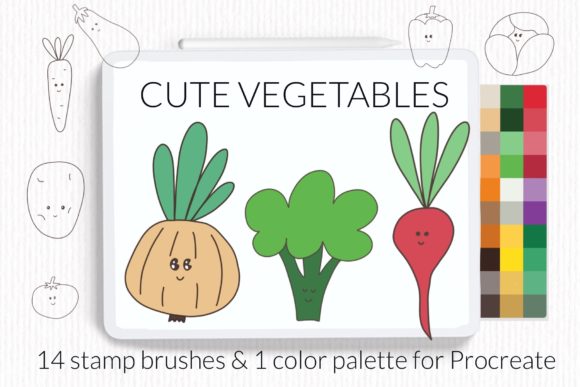
Digital illustration thrives on efficiency and charm, two qualities that often feel at odds when you are staring at a blank canvas. The Cute Vegetable Procreate Stamp Brushes set bridges this gap by offering a curated collection of fourteen hand-drawn doodle stamps featuring everyday produce. From the humble potato to the vibrant paprika, these tools are designed to inject personality into your artwork without requiring hours of detailed rendering. This resource is exclusively for iPad users working within the Procreate ecosystem, providing a seamless way to enhance illustrations, design layouts, and creative projects with organic, playful elements.
Why Vegetable Motifs Matter in Digital Design
Vegetables are universal symbols of health, nature, and comfort. Incorporating them into digital art can soften corporate designs, add warmth to educational materials, or provide whimsical accents for personal journals. The included subjects—potato, radish, cucumber, corn, tomato, paprika, pepper, eggplant, broccoli, pumpkin, peas, cabbage, carrot, and onion—cover a broad spectrum of shapes and colors. This variety ensures that whether you are designing a menu for a farm-to-table restaurant or creating stickers for a planner, there is a suitable element ready to use.
Beyond the stamps themselves, the set includes bonus vegetable swatches featuring thirty realistic colors. These swatches are crucial for maintaining visual harmony. Instead of guessing hex codes to match a carrot’s orange or an eggplant’s purple, artists can sample directly from the provided palette. This attention to color theory saves time and ensures that the final composition looks cohesive and professional.
Tailored Value for Different Creators
The utility of this brush set shifts depending on your experience level and professional goals. Understanding how different audiences interact with these tools can help you decide if they align with your current workflow.
For Beginners and Hobbyists
If you are new to Procreate, the learning curve can sometimes feel steep. Drawing complex organic shapes like broccoli florets or layered cabbage leaves requires practice and patience. For beginners, these stamp brushes serve as both a practical tool and a learning aid. You can place a pre-made vegetable stamp onto your canvas and study its structure, using it as a reference for your own freehand attempts later. The immediate gratification of creating a cute, complete illustration helps maintain motivation during the early stages of learning digital art.
For Professional Illustrators and Designers
Experienced artists often face tight deadlines. While many professionals prefer drawing every element from scratch, there are scenarios where speed is essential. Mockups, storyboarding, and client presentations benefit from rapid asset placement. Using Cute Vegetable Procreate Stamp Brushes allows professionals to block out compositions quickly. You can arrange a scene involving a market stall or a kitchen interior in minutes rather than hours. Once the layout is approved, you can choose to keep the stamps for a stylized look or replace them with detailed hand-drawn versions. The flexibility to toggle between speed and detail is a significant advantage in commercial workflows.
For Educators and Content Creators
Teachers, bloggers, and social media managers constantly need fresh visual content. An educator creating worksheets about nutrition can use these stamps to make healthy eating appear fun and approachable for students. Similarly, a food blogger can use the corn or tomato stamps to create unique headers for recipes without needing advanced graphic design skills. The doodle style is inherently friendly and engaging, making it ideal for audiences that respond well to informal, hand-crafted aesthetics.
For Small Business Owners and Entrepreneurs
Branding for small businesses, particularly those in the food, wellness, or sustainability sectors, relies heavily on visual identity. A local juice bar or an organic subscription box service can use these vegetable elements to create packaging labels, social media posts, and promotional materials. The consistent style of the fourteen stamps ensures that all branded materials look unified. By using the included realistic color swatches, business owners can align the illustrations with their existing brand colors, ensuring a polished and professional appearance.
Technical Features and Usability
This package contains one brushset file with fifteen brushes. The extra brush typically serves as a utility tool, such as a eraser or a specialized texture brush, complementing the fourteen vegetable stamps. The files are optimized for iPad performance, ensuring smooth strokes and responsive pressure sensitivity if you choose to modify the stamps after placement.
The inclusion of thirty realistic color swatches is a standout feature. Many brush sets provide only the stamps, leaving the user to figure out coloring. By providing a curated palette, the creator has done the heavy lifting regarding color harmony. This is particularly useful for users who may struggle with color theory or who want to ensure their vegetables look natural rather than neon or overly saturated.
Installation Guide for Procreate
Getting started with your new brushes is straightforward, but the method varies slightly depending on your device and software version. Below are the steps to install the .brushset file, which is the most efficient method for modern versions of Procreate.
Method 1: Direct Import via Brushset File
This option is recommended for users with recent iPad models and updated Procreate versions. It is the fastest way to get all brushes into your library at once.
- Download the folder containing the .brushset file to your iPad’s Files app.
- Open Procreate and tap on the brush icon in the top right corner to open the Brush Library.
- Tap on any existing brush category to open it, then tap the plus (+) sign or look for the "Import" option depending on your interface.
- Navigate to your downloaded folder and select the .brushset file.
- Procreate will automatically create a new collection with all fifteen brushes installed and ready to use.
Method 2: Manual Installation for Older Versions
Use this option if you have an older iPad or are running Procreate version 4.0 or earlier. This method involves importing individual .brush files.
- Download the folder containing the individual .brush files to a folder on your iPad.
- Open the Files app and locate the folder with the downloaded brushes.
- Tap and hold on a .brush file with your finger or Apple Pencil.
- Choose "Share" from the context menu.
- If the option "Open in Procreate" is not immediately visible, click on "More."
- Scroll through the list, find "Open in Procreate," and select it.
- The brush will import into your currently selected category in Procreate.
- Repeat this process for each of the fourteen vegetable stamps and the bonus brush.
Alternatively, within Procreate, you can open a new collection, select "Import," and navigate to the folder with the downloaded brushes to add them individually. While more time-consuming, this method gives you control over exactly which category each brush resides in.
Making the Most of Your Stamps
To truly leverage the Cute Vegetable Procreate Stamp Brushes, consider combining them with other Procreate features. Use the transformation tool to resize and rotate the vegetables for dynamic compositions. Apply layer effects like Gaussian Blur to create depth, or use clipping masks to add textures to the flat stamps. The realistic color swatches can be used not just for the vegetables, but for backgrounds and text, creating a fully coordinated design system.
Whether you are a student learning the basics of digital composition, a professional speeding up your workflow, or a business owner building a brand, these tools offer a blend of convenience and creativity. By integrating these charming vegetable elements into your projects, you add a touch of organic warmth that resonates with viewers across various contexts. The key is to experiment with placement, scale, and color to find the unique voice that fits your specific creative goals.
© Let s Art ♡