60 Arrow Brushes for Procreate
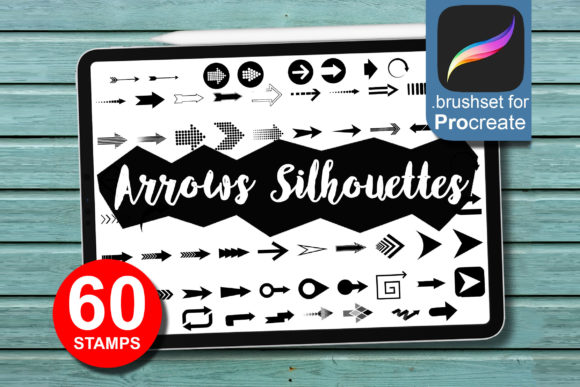
Visual direction is one of the most underrated elements in digital illustration and graphic design. Whether you are mapping out a user journey, highlighting a key feature in a social media post, or adding dynamic movement to a tattoo sketch, arrows do more than point; they guide the viewer’s eye and create narrative flow. The 60 Arrow Set, Brushes for Procreate is not just a collection of clip art; it is a curated toolkit designed to streamline your workflow while maintaining a hand-crafted aesthetic. For designers, marketers, and hobbyists who rely on the iPad ecosystem, this set bridges the gap between rigid vector graphics and organic, human touch.
Unlike standard shape tools that produce sterile, uniform lines, these brushes emulate the natural variation of hand-drawn strokes. Each arrow carries a distinct personality, ranging from bold and assertive to whimsical and sketched. This versatility makes them an invaluable asset for anyone looking to elevate their design assets without spending hours drawing each element from scratch. By integrating these tools into your daily routine, you can maintain consistency across projects while significantly reducing production time.
The Aesthetic Appeal of Hand-Drawn Directionals
The visual characteristics of the 60 Arrow Set, Brushes for Procreate are defined by their organic imperfections. In an era where modern typography and clean UI design often dominate, there is a growing demand for elements that feel authentic and approachable. These brushes deliver exactly that. They are hand-drawn in high resolution, ensuring that every stroke retains its texture and depth, even when scaled up for large-format prints or detailed illustrations.
The set includes a variety of styles that cater to different creative needs. You will find thick, marker-style arrows that work well for bold statements, as well as finer, pencil-like strokes suitable for delicate annotations. This range allows you to match the arrow style to the tone of your project. For instance, a rough, charcoal-style arrow might complement a gritty, urban logo design, while a smooth, inked arrow could enhance a polished piece of editorial design. The key advantage here is the ability to convey emotion through direction. An arrow is no longer just a functional indicator; it becomes part of the visual voice of your brand.
Moreover, because these are true brushes rather than static stamps, they respond to pressure sensitivity. If you are using an Apple Pencil, the line weight will vary naturally based on how hard you press, giving you complete control over the emphasis and flow of each shape. This interactivity is crucial for creating creative font pairings and illustrative elements that feel alive rather than pasted on.
Practical Applications Across Industries
The utility of this brush set extends far beyond simple doodles. For entrepreneurs and small business owners, visual communication is critical. Imagine creating a carousel post for Instagram where you need to highlight specific benefits of your product. Instead of searching for generic stock icons, you can use these arrows to draw attention directly to the text or image features, creating a cohesive look that aligns with your brand identity. This level of customization helps in building recognition and trust with your audience.
In the realm of packaging design, hand-drawn elements can make a product stand out on crowded shelves. Arrows can be used to point out eco-friendly materials, usage instructions, or special offers in a way that feels personal and engaging. Similarly, in web design and app prototyping, these brushes can be used in wireframes to indicate user flow or interaction points, providing a clearer, more intuitive presentation for clients compared to standard digital pointers.
For tattoo artists and illustrators, the high-resolution quality of the 60 Arrow Set, Brushes for Procreate is a game-changer. Tattoo designs often require precise linework and dynamic composition. These brushes allow artists to quickly sketch out directional flows within a larger piece, helping to visualize how the design will sit on the body. The ease of use means less time spent on repetitive drawing and more time focusing on the artistic integrity of the overall composition.
Enhancing Readability and Visual Hierarchy
One of the most significant impacts of using directional elements like arrows is their effect on readability and visual hierarchy. In social media graphics or informational posters, viewers often scan content rather than reading it word-for-word. Arrows act as visual cues that direct the eye to the most important information first. When used effectively, they create a path for the viewer to follow, ensuring that your message is received in the intended order.
However, the style of the arrow matters. A heavy, bold arrow can create a strong focal point, ideal for headlines or call-to-action buttons. In contrast, a subtle, thin arrow can guide the eye without overpowering the text. This balance is essential in publishing and marketing materials where clarity is paramount. By choosing the right brush from the set, you can influence how professional and polished your final output appears. Consistency in style also contributes to a cohesive look, reinforcing the professionalism of your work.
Furthermore, these brushes can help break up dense blocks of text. In long-form content or educational materials, inserting hand-drawn arrows to highlight key takeaways can improve engagement and retention. It adds a layer of interactivity to static content, making it more appealing to readers who might otherwise skim over important details.
Technical Requirements and Best Practices
To get the most out of the 60 Arrow Set, Brushes for Procreate, you need the right hardware and software. The set is optimized for iPad Pro or standard iPad models paired with an Apple Pencil or any pen that supports pressure sensitivity. This ensures that you can fully utilize the dynamic brush engine, which responds to tilt and pressure for natural-looking strokes. The software requirement is Procreate Version 5.0 or higher, which provides the necessary brush stability and feature set for smooth performance.
When incorporating these brushes into your workflow, consider the following best practices:
- Test Font Pairings: If you are combining these arrows with text, ensure the style of the arrow complements your chosen typeface. A handwritten arrow pairs well with a script font or a casual sans serif font, while a more structured arrow might work better with a serif font or a bold display font.
- Evaluate Project Fit: Before starting, determine the tone of your project. Is it playful, professional, or edgy? Choose the arrow style that aligns with this mood to maintain consistency.
- Check Licensing: Always review the licensing terms for any commercial font or brush set you purchase. This set is designed for both personal and commercial use, making it a safe choice for client work and product sales.
- Layer Management: Keep your arrows on separate layers. This allows you to adjust opacity, color, and position without affecting the rest of your design, giving you flexibility during the editing process.
By understanding the technical nuances and creative potential of the 60 Arrow Set, Brushes for Procreate, you can transform simple directional cues into powerful design elements. Whether you are a seasoned designer or a creative enthusiast, these tools offer a practical solution for enhancing your projects with speed, style, and precision.